
Guzzi510
Momento Mori
Innovv C3 motorcycle dashcam group buy** 2nd round**
**2nd Group buy now closed**: updates will be posted here
All cameras that had paid shipping have been shipped out to everyone
I don't do this for a living so all group buy rules apply.
If you'd like to do this for a living I can introduce you to the Innovv guys if your serious about it.
Last day to get your money in was 11:59pm on 5/10/15
The cameras will be express shipped to me and then rechecked to make sure you don't have any problem with what you get and that will put deliver to you around the weekend of the 16th of May.
Full camera kits will come with:
Innovv C3
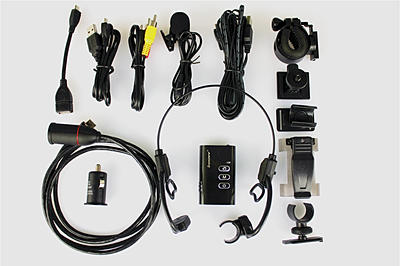
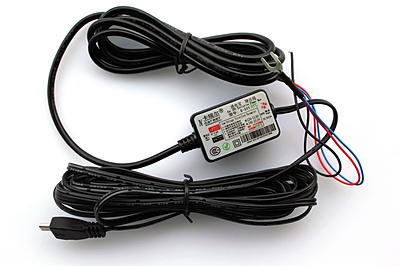
12v to 5v transformer
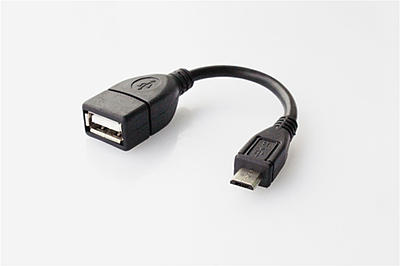
OTG cable for Android phones
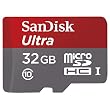
And a 32gb micro SD card- Class 6 or 10
Picture is for reference only- card brand won't be guaranteed
Testing thread
http://www.bayarearidersforum.com/forums/showthread.php?t=462974
Pick up would be in the Bay Area-east bay or ride meet up, out of area people and those who don't want to pick up would be shipped at cost.
Any discrepancies in shipping costs or if you're picking it up will either be invoiced or refunded.
Warranty will be honored locally so no shipping to China if you have an issue
Quick Start Guide
Download the configuration utility and make a shortcut to it on your desktop.
Camera configuration utility
Connect the camera lens cable to the recording unit and put your MicroSD card in it.
The camera cable must be connected to the recording unit for your computer to see the recording unit as a drive
Hold the top and bottom buttons at the same time until the LED flashes green to format your card.
Connect your camera to your computer with the provided shorter usb cable and open open the configuration utility.
You'll want to turn off the G-Sensor Sensitivity if you're going to use the camera on a motorcycle.
All of the other setting are personal preference. In most of the sample videos I had the Saturation set to high and the EV set to -0.5 or -1
If you're using the date and time stamp, anything that you change the "ITS MY VIDEO" box to has to be in capital letters or it won't show up
After you have your settings all done click the create configuration file button on the bottom left of the box. nothing will happen that you can see when you click it and you only have to click it once.
Then click the save to camera button and then select your camera drive from the list, it should be in the computer list of drives, click ok and then hold the camera power button for 3 seconds to tun it off and then hold for 3 seconds again to turn it back on and the LED should start flashing red while the camera is updating. That should be all you need to get started.
For Mac and Android users
Here is a manual way to update settings on Mac and Android
Download these files from my DropBox
Instructions in txt file
https://www.dropbox.com/s/ua2p996rci811nb/ALL_SETTINGS-C3.txt?dl=0
.bin file for C3 for you to edit
https://www.dropbox.com/s/d86v5pxnq2w3oxx/c1config.bin?dl=0
Firmware reloading procedure:
Download the FWC3.bin file from this link
https://www.dropbox.com/s/ulk9aclbfh1yzck/FWC3.bin?dl=0
Procedure for updating firmware when the camera is installed on your bike:
After downloading the file FWC3.bin follow these instructions exactly.
Remove the memory card from the camera and put it in your computer and erase the DCIM folder.
Copy the FWC3.bin file to your memory card.
Remove the card from your computer and put it back in the camera with the camera turned off and no power to it.
Make sure that the lens cable is attached and turn your bike power on to the point that the power is applied to the camera and leave it on.
You will see a series of flashing green led flashes,DO NOT TURN OFF THE POWER WHILE THE GREEN LED IS FLASHING
After the green led stops your ready to go, your previous settings have not been changed so no need to reload them.
If you having an problem check this out and if you don't find your answer let me know and I get it sorted out for you.
C3 camera common questions and answers:
Q: My computer doesn't show the camera as a drive.
Q: The picture is upside down on some of my videos or my video is not level.
Q: The LED is flashing red and orange when my camera starts
[youtube]On8NOMefuqA?vq=hd1080[/youtube]
**2nd Group buy now closed**: updates will be posted here
All cameras that had paid shipping have been shipped out to everyone
I don't do this for a living so all group buy rules apply.
If you'd like to do this for a living I can introduce you to the Innovv guys if your serious about it.
Last day to get your money in was 11:59pm on 5/10/15
The cameras will be express shipped to me and then rechecked to make sure you don't have any problem with what you get and that will put deliver to you around the weekend of the 16th of May.
Full camera kits will come with:
Innovv C3
12v to 5v transformer
OTG cable for Android phones
And a 32gb micro SD card- Class 6 or 10
Picture is for reference only- card brand won't be guaranteed
Testing thread
http://www.bayarearidersforum.com/forums/showthread.php?t=462974
Pick up would be in the Bay Area-east bay or ride meet up, out of area people and those who don't want to pick up would be shipped at cost.
Any discrepancies in shipping costs or if you're picking it up will either be invoiced or refunded.
Warranty will be honored locally so no shipping to China if you have an issue
Quick Start Guide
Download the configuration utility and make a shortcut to it on your desktop.
Camera configuration utility
Connect the camera lens cable to the recording unit and put your MicroSD card in it.
The camera cable must be connected to the recording unit for your computer to see the recording unit as a drive
Hold the top and bottom buttons at the same time until the LED flashes green to format your card.
Connect your camera to your computer with the provided shorter usb cable and open open the configuration utility.
You'll want to turn off the G-Sensor Sensitivity if you're going to use the camera on a motorcycle.
All of the other setting are personal preference. In most of the sample videos I had the Saturation set to high and the EV set to -0.5 or -1
If you're using the date and time stamp, anything that you change the "ITS MY VIDEO" box to has to be in capital letters or it won't show up
After you have your settings all done click the create configuration file button on the bottom left of the box. nothing will happen that you can see when you click it and you only have to click it once.
Then click the save to camera button and then select your camera drive from the list, it should be in the computer list of drives, click ok and then hold the camera power button for 3 seconds to tun it off and then hold for 3 seconds again to turn it back on and the LED should start flashing red while the camera is updating. That should be all you need to get started.
For Mac and Android users
Here is a manual way to update settings on Mac and Android
Download these files from my DropBox
Instructions in txt file
https://www.dropbox.com/s/ua2p996rci811nb/ALL_SETTINGS-C3.txt?dl=0
.bin file for C3 for you to edit
https://www.dropbox.com/s/d86v5pxnq2w3oxx/c1config.bin?dl=0
Firmware reloading procedure:
Download the FWC3.bin file from this link
https://www.dropbox.com/s/ulk9aclbfh1yzck/FWC3.bin?dl=0
Procedure for updating firmware when the camera is installed on your bike:
After downloading the file FWC3.bin follow these instructions exactly.
Remove the memory card from the camera and put it in your computer and erase the DCIM folder.
Copy the FWC3.bin file to your memory card.
Remove the card from your computer and put it back in the camera with the camera turned off and no power to it.
Make sure that the lens cable is attached and turn your bike power on to the point that the power is applied to the camera and leave it on.
You will see a series of flashing green led flashes,DO NOT TURN OFF THE POWER WHILE THE GREEN LED IS FLASHING
After the green led stops your ready to go, your previous settings have not been changed so no need to reload them.
If you having an problem check this out and if you don't find your answer let me know and I get it sorted out for you.
C3 camera common questions and answers:
Q: My computer doesn't show the camera as a drive.
- Make sure that you have a memory card in the camera
- The lens cable has to be attached to the camera body for the computer to see it as a drive
- You have to use the shorter usb cable that came with the kit to transfer data, the longer cable is for power only.
Q: The picture is upside down on some of my videos or my video is not level.
- The little nub on the lens housing us the up indicator, rotate to point up.
- make sure that the gsensor is set to off in the settings options
Q: The LED is flashing red and orange when my camera starts
- Unless the battery is 100% charged when you start you’ll see an alternating red and orange LED while the internal battery is charging and just a red blinking LED once the battery is fully charged.
[youtube]On8NOMefuqA?vq=hd1080[/youtube]
Last edited:


