Using Google Maps, it is not ideal but possible and free. This is a very quickly done example. Are you comfortable editing XML? Map tools use KML format for overlays, and is essentially the same as XML. I can't attach a KML file but will show the contents below. If you want to use AI (like chatgpt), you can export the spreadsheet to a CSV file, upload it, and ask it to format a KML file however you want. Then make your way to
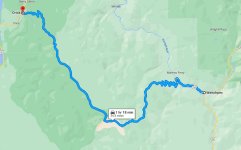
https://www.google.com/mymaps, click "Create a New Map", and then import the KML file in a new layer. In this example, google Maps should not show the direct line (as it is in the image) but follow the route, but a direct line is what it shows. With the description overlay, it looks like this:

Hoping others have ideas on how to make this look better. You should be able to import all your routes and descriptions through one KML file and iterate on how you want to improve it, including adding more latitude/longitude entries so the line matches better to the actual route. You can also color code each route, then click around to show one description at a time.
Here is the contents of the KML file used, and it is done with one row of your data, unedited:
<?xml version="1.0" ?>
<kml xmlns="
http://www.opengis.net/kml/2.2">
<Document>
<Placemark>
<name>CA 175 (Middletown to Kelseyville)</name>
<description><b>Region:</b> Bay Area – Clear Lake<br>
<b>Distance:</b> 20 miles<br>
<b>Surface:</b> Fully paved<br>
<b>Bike Types:</b> Sport<br>
<b>Rating:</b> 9.5<br>
<b>Fun:</b> 10 | <b>Condition:</b> 10 | <b>Debris:</b> 9 | <b>Traffic:</b> 9<br>
<b>Bike Used:</b> Sport on Sun, 05/10/20<br>
<b>Notes:</b> Superb road with smooth pavement, lovely undulations, and a nice variety of turns, most of which are medium in size.<br>
<a href="
https://www.google.com/maps/dir/38.7524206,-122.6153787/38.9423513,-122.7922068">Google Maps Route</a></description>
<LineString>
<tessellate>1</tessellate>
<coordinates>-122.6153787,38.7524206,0 -122.7922068,38.9423513,0</coordinates>
</LineString>
</Placemark>
</Document>
</kml>
Hope it helps!





 for your track bike


