• There has been a recent cluster of spammers accessing BARFer accounts and posting spam. To safeguard your account, please consider changing your password. It would be even better to take the additional step of enabling 2 Factor Authentication (2FA) on your BARF account. Read more here.

VPN's

Same - up to 200 mb/s. Moved to a new place last summer, and was seeing 170 -180 with a brand new SB6190, but it sometimes was worse. After troubleshooting/replacing a bad wireless gateway of my own, and continuing to play with the SB6190 and the modem provided by Comcast, with their modem I see 240 mb/s pretty consistently. I wouldn't have expected those results either given the specs, but it is what it is.

Wifi I see a bit less, as expected, but can typically still get 200 mb/s+ from most rooms in the house. Haven't noticed more of a VPN performance hit while on wireless compared to the performance hit while wired, but will play with it when I have a chance. I wouldn't think there would be much difference in the speed degradation.
 
Last edited:
Same - up to 200 mb/s. Moved to a new place last summer, and was seeing 170 -180 with a brand new SB6190, but it sometimes was worse. After troubleshooting/replacing a bad wireless gateway of my own, and continuing to play with the SB6190 and the modem provided by Comcast, with their modem I see 240 mb/s pretty consistently. I wouldn't have expected those results either given the specs, but it is what it is.

Wifi I see a bit less, as expected, but can typically still get 200 mb/s+ from most rooms in the house. Haven't noticed more of a VPN performance hit while on wireless compared to the performance hit while wired, but will play with it when I have a chance. I wouldn't think there would be much difference in the speed degradation.

Damn, that's pretty awesome.

Running tests via wireless right now, I'm getting 23mb/s, which is unusually slow.

I'm running a Linksys AC1900, flashed with DDWRT, and a Arris SB6190. Returned Comcast's modem/router a few months ago and didn't notice a degradation in speed.

Any recommended changes for the SB6190?
 
It makes sense to me that commercial VPN services are going to be problematic because:

1. Content providers like Netflix and other interested parties (e.g. governments that abuse human rights) will learn what IP addresses they use and will block them.

2. The service itself wants to maximize profits and thus will place restrictions on bandwidth.

So it makes sense to install your own VPN server in a location that avoids these problems. Which gets back to my post #5. This might be at your home if you're traveling overseas.

I'm getting roughly comparable results with and without my VPN server at Digital Ocean, but my ISP is slower than cable (the 18 Mbps plan from DSLExtreme, today giving me 20-22 Mbps).
 
My current go to VPN doesn't have issues with streaming services. If I do, I generally switch to a SSH tunnel to an EC2 instance. I generally set them up in cloudy proximity to where I'm working.
 
I'm running a Linksys AC1900, flashed with DDWRT, and a Arris SB6190. Returned Comcast's modem/router a few months ago and didn't notice a degradation in speed.

Any recommended changes for the SB6190?

No, I couldn't get it above 200 mb/s, so I shelved it and just use the Comcast one. I do use an Arris AC3200 wifi router, which also seem to help speeds compared to an Asus or a Linksys (neither going over 200 mb/s). At this point it probably wouldn't make sense spending any money on a DOCSIS 3.0 modem (like the 6190); Arris is selling the SB8200 with the 3.1 spec, which is what Comcast requires for their very high speed services.
 
No, I couldn't get it above 200 mb/s, so I shelved it and just use the Comcast one. I do use an Arris AC3200 wifi router, which also seem to help speeds compared to an Asus or a Linksys (neither going over 200 mb/s). At this point it probably wouldn't make sense spending any money on a DOCSIS 3.0 modem (like the 6190); Arris is selling the SB8200 with the 3.1 spec, which is what Comcast requires for their very high speed services.

Today I was getting 240mb/s via my Nuc media server, which runs off of copper from my Linksys.

WiFi speeds were back up to 60-90mb/s, 30-50mb/s with my VPN connected to a SF based server.

Seems like my speed issues are likely related to traffic in my area.

The 6190 was only like $100, so if I need to upgrade soon, I won't fret.

When Comcast's gigabit service becomes available​ in the bay, I'll switch over.

https://arstechnica.com/information...bit-cable-will-be-in-15-cities-by-early-2017/
 
Last edited:
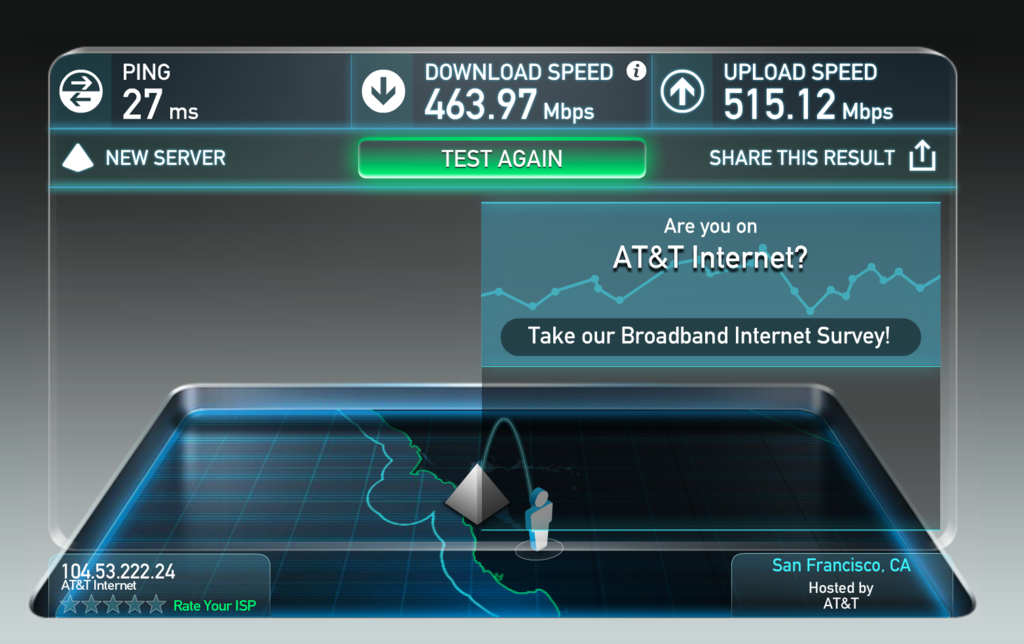
VPN disabled, Chrome browser, a few other windows open, wireless connection, + playing on PS4 simultaneously as speed test:
6185504624.png


VPN enabled, Firefox browser, no other windows open, wireless connection, still playing on PS4:
6185512935.png
 
VPN disabled, Chrome browser, a few other windows open, wireless connection, + playing on PS4 simultaneously as speed test:
6185504624.png


VPN enabled, Firefox browser, no other windows open, wireless connection, still playing on PS4:
6185512935.png


Jesus, this is at your home on DSL?!
 
That's fantastic. Can't wait for similar technology / pricing to be rolled out wider.
 
I've always had a VPN to my home network, it helps when I travel out of the country and I want to watch Netflix, or use it to secure connections when I'm on public wifi hotspots. I used to use an old Mac Mini, but it eventually died. Later, I bought a Raspberry Pi and set that up as my VPN server. Bonus, I can access my home network as well. So I am able to setup other services too.

Today, I setup a new VPN using Algo on an AWS server. I'm on the free tier for the next 12 months, so pretty good. At the end of the 12 months, I'll see how much it costs to run it on AWS, and then decide. Another option would be Digital Ocean servers with a more fixed cost than AWS.

I've been thinking about getting a commercial VPN solution, but never did fully trust VPN providers, thus the homegrown solutions.
 
Good info, thx. All depends what the reasons for using VPN are. If it's meant essentially as a ventriloquist, allowing for US resources when out of the country, or protecting while on public/sketchy wifi, setting up your own on AWS seems like a fantastic idea. If folks are using it to limit tracking / hide usage of whatever they are doing on the internet (torrents, pr0n, hacking sites, etc.), setting up an individual VPN that is then used for all of that would not stand up to scrutiny if things ever did get ugly. It wouldn't be hard for AWS to give up any information they had on the box, along with any logging that was available at the infrastructure level.

Algo's FAQ explains it better than I could:

https://github.com/trailofbits/algo/blob/master/docs/faq.md

The goal of this project is not to provide anonymity, but to ensure confidentiality of network traffic while traveling. Tor introduces new risks that are unsuitable for Algo's intended users. Namely, with Algo, users are in control over the gateway routing their traffic. With Tor, users are at the mercy of actively malicious exit nodes.
 
Last edited:
I set up my own VPN server using OpenVPN because I don't trust any of the services out there. Originally had it on AWS, but ended up moving over to Digital Ocean because they include 1TB of network transfer with their cheap $5/month droplet and I was tired of paying for the network transfer costs with Amazon.
 
I set up my own VPN server using OpenVPN because I don't trust any of the services out there. Originally had it on AWS, but ended up moving over to Digital Ocean because they include 1TB of network transfer with their cheap $5/month droplet and I was tired of paying for the network transfer costs with Amazon.

:thumbup

That's probably what I'm going to end up doing with my VPN, I'm on the AWS free tier at the moment, so I'm not paying for anything... yet. :teeth I'll take the free stuff for the moment, then switch to Digital Ocean when my 12 months is up. :)
 
I set up my own VPN server using OpenVPN because I don't trust any of the services out there. Originally had it on AWS, but ended up moving over to Digital Ocean because they include 1TB of network transfer with their cheap $5/month droplet and I was tired of paying for the network transfer costs with Amazon.

I'd like to try this out. Any chance you can provide the links on how to set up OpenVPN?

I currently have a basic pptp vpn on Windows Server 2012 at home just to experiment with.
 
Back
Top