• There has been a recent cluster of spammers accessing BARFer accounts and posting spam. To safeguard your account, please consider changing your password. It would be even better to take the additional step of enabling 2 Factor Authentication (2FA) on your BARF account. Read more here.

Innovv C3 camera testing- motorcycle dashcam

Just witnessed an accident on my way to work and came back all excited to find out that my camera has not been recording. Lights up red when I turn the bike on, but no new files since October. Will have to do some troubleshooting.
Weird, it should be flashing red and orange. I'd start with reuploading the config file with the camera set to record when it detects power.

I found out a new bug a few nights ago if you have HIDs. If you have the camera hooked up to come on with the ignition power, but your lights come on when the engine kicks over, the voltage drop from the ballast will knock out the video signal. Oddly enough the sound keeps going through. It leaves the camera recording even after you turn the bike's power off, and the video you get is a frozen frame of whenever the engine was started.

Solution: wire up the camera to come on with engine power. There's just enough of a delay in the camera turning on to avoid the voltage drop from the ballasts. :thumbup
 
Weird, it should be flashing red and orange. I'd start with reuploading the config file with the camera set to record when it detects power.

I found out a new bug a few nights ago if you have HIDs. If you have the camera hooked up to come on with the ignition power, but your lights come on when the engine kicks over, the voltage drop from the ballast will knock out the video signal. Oddly enough the sound keeps going through. It leaves the camera recording even after you turn the bike's power off, and the video you get is a frozen frame of whenever the engine was started.

Solution: wire up the camera to come on with engine power. There's just enough of a delay in the camera turning on to avoid the voltage drop from the ballasts. :thumbup

Hmm.. doesn't the flashing red & orange just signify that the battery is fully charged? If it's just flashing orange, that just means the battery is currently charging or he's running off the innovv batt.

I don't have HID's, but I've experienced what you're describing once: I had working video & audio footage for an initial 5 minutes before the video freezes & audio continued to record.

I have my innovv setup turn on when I connect this quick connect harness that runs to the bike's battery; and on that particular day I connected the harness first prior to starting the bike.

http://www.amazon.com/Battery-Tende...20753871&sr=8-1&keywords=battery+tender+cable

Ever since that time, I've been turning on my bike first, then connecting the quick connect harness for innovv power. Haven't had the video freeze since. I'm thinking maybe starting the bike caused enough of a voltage drop to cause a malfunction? I did not mess with reloading a newer config file; which I probably should LOL
 
It is wired to the bike's power (through USB port on the stereo). When I turn it on, the light starts off yellow then turns a solid red. I assumed this meant recording, but maybe I'm wrong. Here's the current configuration:

datetime=2014:10:21 23:54:02
datestamp=on
videostamp=DANATE
poweronrecord=on
autopoweroff=30s
moviesize=1080p
photosize=3m
videocliplength=3min
selftime=off
continueshot=1
videosound=on
wb=normal
recordingindicator=on
hz=50
motiondetect=off
ev=-0.5
saturation=high
gsensor=off
tvmode=ntsc
lapsetime=off

I already did the firmware update as well.
 
I figured it out. I originally had used it with a battery pack, but had switched it to the USB plug on my stereo. The camera must think the stereo is a hard drive instead of just a power source so it won't start recording. Hooked it back up to the battery pack and it records fine now. Will have to hardwire a USB to the battery for it.
 
Hmm.. doesn't the flashing red & orange just signify that the battery is fully charged? If it's just flashing orange, that just means the battery is currently charging or he's running off the innovv batt.

I don't have HID's, but I've experienced what you're describing once: I had working video & audio footage for an initial 5 minutes before the video freezes & audio continued to record.

I have my innovv setup turn on when I connect this quick connect harness that runs to the bike's battery; and on that particular day I connected the harness first prior to starting the bike.

http://www.amazon.com/Battery-Tende...20753871&sr=8-1&keywords=battery+tender+cable

Ever since that time, I've been turning on my bike first, then connecting the quick connect harness for innovv power. Haven't had the video freeze since. I'm thinking maybe starting the bike caused enough of a voltage drop to cause a malfunction? I did not mess with reloading a newer config file; which I probably should LOL
Solid orange is charging, flashing red is recording. When it's set to record with USB power, it should flash red and orange.

It could be the engine/stator turning over causing the video to drop out, similar to how the ballast sucks up a ton of power to fire the bulbs.

Figured out what the L/HT means on the file prefix. L is an power on or automatically record loop, HT is the end of that loop series when you turn the engine off.
 
Solid orange is charging, flashing red is recording. When it's set to record with USB power, it should flash red and orange.

It could be the engine/stator turning over causing the video to drop out, similar to how the ballast sucks up a ton of power to fire the bulbs.

Figured out what the L/HT means on the file prefix. L is an power on or automatically record loop, HT is the end of that loop series when you turn the engine off.

thank you for this! couldn't figure out what those mean.
 
Last edited:
I have a 64gb card and it came out ok.
http://i.imgur.com/mFsvGTC.jpg

poweronrecord=on
autopoweroff=none
moviesize=1080p
photosize=3m
videocliplength=3min
selftime=off
continueshot=1
videosound=on
wb=normal
recordingindicator=on
hz=60
motiondetect=off
ev=0
saturation=normal
gsensor=off
tvmode=ntsc
lapsetime=off

Those are my settings. I have no idea why some come with an L prefix, and others are HT, but it works just fine. It overwrites the older files first.

Hi, This is Rock Liu, the developer and manufacturer of INNOVV camera, this is my first post on the forum, but for sure I will spend more time here to listen to people and do support.

The point you mentioned L and HT files, that happens on current FW, we have been noticed this issue, now FW guys have been working on this and other bugs, like 30 minutes video clips the camera crash issue.

Once get bugs solved, will release new FW for update,
If any other issues you are experienced, please feel free to share. :)
 
thank you for this! couldn't figure out what those mean.

Let me explain,

1. Power connected to camera or power on, red color flashing, auto recording, 1080p.
2. Press shutter button, or camera standby, solid red color.

L file is the files recorded in loop recording mode,
HT file is the files recorded in one video recording mode.
Due to the mistake from FW guys, now two files got mixed in loop recording, so current in loop model, both HT and L files created, L files almost at the end of recording. This problem should be fixed at the coming FW update.
 
Welcome Rock and thanks for joining us. Glad to see you supporting your product.
 
Let me explain,

1. Power connected to camera or power on, red color flashing, auto recording, 1080p.
2. Press shutter button, or camera standby, solid red color.

L file is the files recorded in loop recording mode,
HT file is the files recorded in one video recording mode.
Due to the mistake from FW guys, now two files got mixed in loop recording, so current in loop model, both HT and L files created, L files almost at the end of recording. This problem should be fixed at the coming FW update.

I'm assuming you are the owner of this company.

I also assume that FW means Firmware. When is the firmware coming out?
 
Welcome, Rock! Glad to see you here!
 
I'm assuming you are the owner of this company.

I also assume that FW means Firmware. When is the firmware coming out?

We have partners, a team together since 2009 to develop the first keychain camera, now have INNOVV. :rolleyes

We have a list of update to Firmware guys, they are working hard, once it is ready, I will update here.
 
Welcome, Rock! Glad to see you here!

Thank you!:)

I think I need to appreciate Willy, He created the thread and introduced the C3 to people, he have been done great job since the development, he worked with us since the prototype, he has rich knowledge and solid experience on development, testing.
 
Thanks for Hoho, the end I can put video here. :)

Below is the instruction how to connect Innovv C3 to computer.

[youtube]zbRGq0OpsHs[/youtube]
 
Last edited:
The Smart installation on motorcycle,

rear-cam-jpg.10191
 
The most important feature for C3, is the solid and small lens case that allow people to mount it anywhere on motorcycle in need and it is invisible.

The guy from UK had GoPro mounted on Bar, but it was gone after 30 minutes he came back from shopping center. :(

fazer8-cam-jpg.10210
 
Thanks for Hoho, the end I can put video here. :)

Below is the instruction how to connect Innovv C3 to computer.

[youtube]zbRGq0OpsHs[/youtube]

For those of us that have the lens permanently mounted it would be nice to have a dummy plug that could be put in the camera ( in lie of the lens)when transfering files to a computer.
That way we wouldn't have to put the card in a reader.
Or failing a plug - how about a firmware fix?
 
For those of us that have the lens permanently mounted it would be nice to have a dummy plug that could be put in the camera ( in lie of the lens)when transfering files to a computer.
That way we wouldn't have to put the card in a reader.
Or failing a plug - how about a firmware fix?

You can always pop out the MicroSD card and put it into a reader. There are some cheap readers out there that will do all sorts of various formats of memory cards.

Transcend MicroSD Card Reader
 
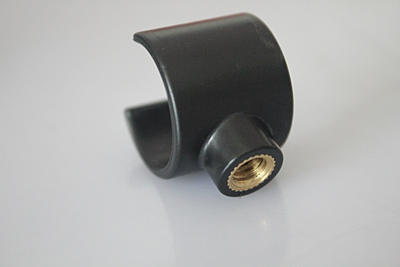
Free Lens case clip dispatch

Received many message mentioned below lens case clip is the most useful mount to allow C3 lens can be mounted on anywhere of motorcycle, so would like to have one more.

Now set up the program, that starting from today till end of Feb, you can leave a message on forum to get free Lens case clip.:laughing:laughing:laughing.

4a7279_8391063b3b3844fa8a3324435019a104.jpg_srz_p_400_267_75_22_0.50_1.20_0.00_jpg_srz
 
Back
Top